

Hey, I’m Rafid. I run growth at Yuma AI, a customer experience platform for ecommerce brands. We recently moved our entire marketing site off 📝Webflow onto a code-based stack managed almost entirely through Claude Code. We’re now shipping pages in hours vs. days, everything is perfectly configured for 📝AEO/GEO, and we’ve unlocked 📝ABM personalized pages without needing a new vendor. In the first 30 days after the new site went live, total users were up 13%, page views up 27%, and bounce rate down 21%.
For context, I’m the only person doing web dev and managing the site end to end. No creative agency or developers behind me. With this setup, I’m doing the work of 5 people, and that wouldn’t have been possible on the old stack. Now, I am shipping pages twice a week alongside other responsibilities like content production, ads, product launches, event launches, competitor intelligence, marketing automation, and more.
Why we left Webflow
I’ve been a huge fan of Webflow since 2017. I taught myself to use it in early 2017 by trying to build a website in just 2 nights. After years of fandom and building Webflow skills - I started hitting walls:
- Anything custom turned into a mini-project
- Animations and high-functioning pages were painful to build
- Page templates were rigid in ways that forced our content into shapes we didn’t want
- The CMS structure made us think backward, having to model content around what Webflow allowed
- We were burning real money on the platform and seats every month
- Adding more international languages meant either painful manual work or paying for a recurring service like Weglot on top of the existing platform cost
But the biggest pain was that the speed of marketing experiments was capped by the tool.
How we migrated
We did the initial migration with the help of our engineering team, which took about 1.5 weeks. We didn’t transfer Webflow’s structure into the new codebase. We rebuilt the site from scratch the way we actually wanted it and pulled content over separately afterwards.
We synced published Webflow content through the official Webflow Data API into our new content model. That kept the new site consistent content-wise without dragging in Webflow’s quirks.
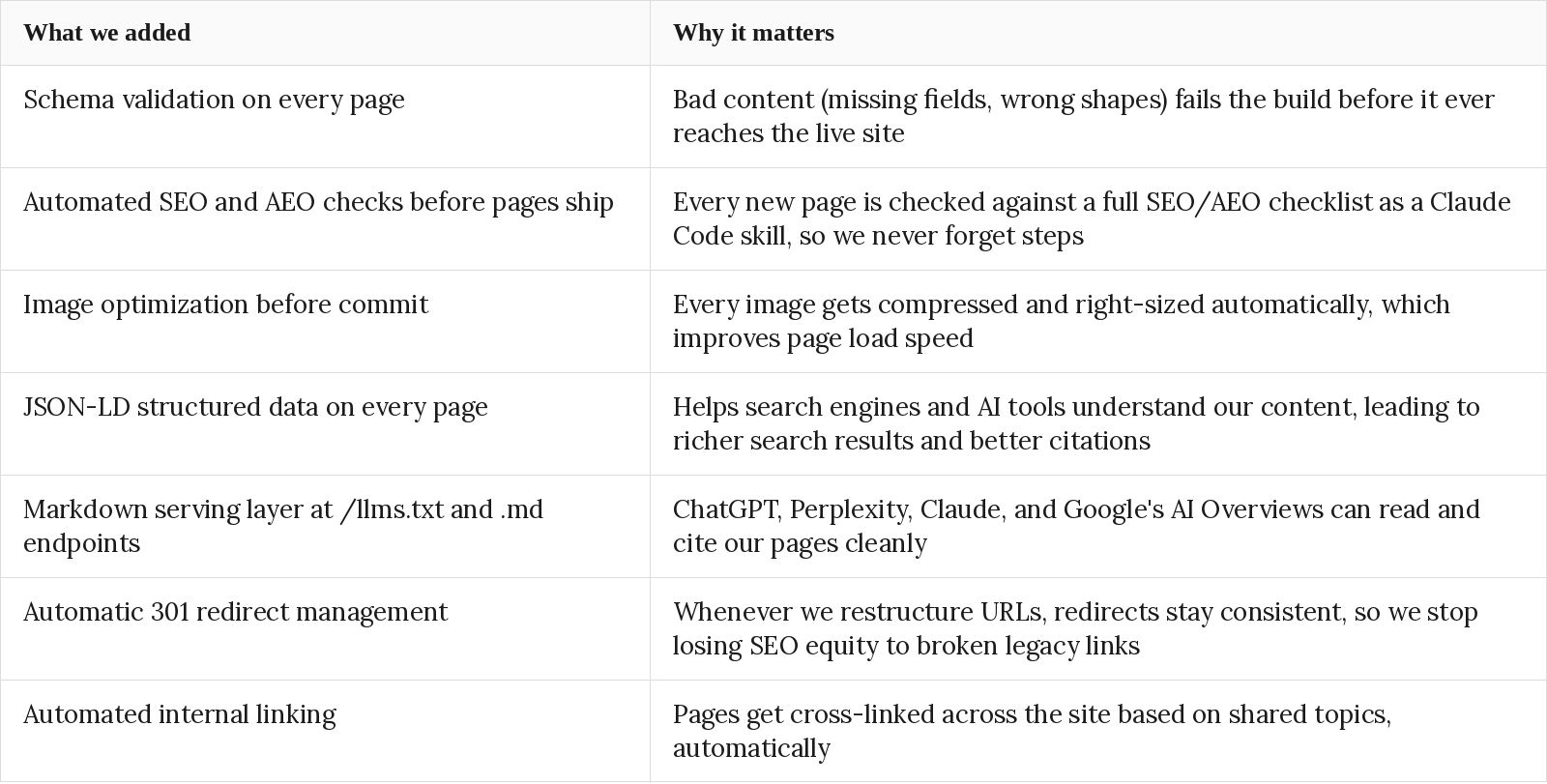
Throughout the rebuild, we baked in everything Webflow couldn’t do natively or made painful:
Claude skills are the most useful piece of infrastructure
The single biggest unlock from the migration was the system of Claude Code skills we built alongside it. A skill is a written runbook for a recurring job: adding a blog post, spinning up a comparison page, running the SEO preflight, handling a slug change with redirects. Claude follows it the same way every time.
This is genuinely better than Webflow page templates. A template gives you a visual starting point: a layout with placeholder content to fill in. A skill does that and everything around it. When I add a new case study, the skill writes the page on the right template, validates the metadata, runs the SEO and AEO checks, optimizes the images, updates internal linking to and from related pages, adds structured data, and ships it. What used to be a 15-step manual checklist is now one prompt.
What this unlocked
Some of the stuff we’ve been doing faster than ever due to Claude Code:
Revenue-adjacent:
- ABM pages for specific target accounts, used in ad campaigns and sales outreach
- ROI calculators and web apps as lead magnets for marketing campaigns and sales outreach
- Hyper-targeted industry pages
- Competitor displacement comparison pages
- A/B testing and experimental web pages
Localization:
- Handle our multi-language website (English, French, and any future locales) without us paying for a translation service like Weglot. When we want to add a new language, Claude Code translates every page, slug, and structured field into the target language in one pass
SEO and AEO infrastructure:
- A full SEO and AEO checklist that runs on every new page before it ships, codified as a Claude Code skill
- A markdown serving layer at /llms.txt and .md endpoints so ChatGPT, Perplexity, Claude, and Google’s AI Overviews can read and cite our pages cleanly
- JSON-LD structured data on every page (articles, FAQs, breadcrumbs, products) for richer search results
- Build-time content validation through Zod schemas: no bad content reaches prod
- 301 redirects and sitemap kept consistent automatically whenever we restructure URLs, so we stop losing SEO equity to broken legacy links
- Automated content-aware internal linking across the site, scored on shared topics and content clusters
- Core Web Vitals dramatically better than they were on Webflow, which compounds into both SEO and conversion
Craft and reach:
- High fidelity, fully HTML animations on the site that previously would have taken hours of creative and dev work
- Image optimization built into the workflow: lossless compression and right-sizing before commit
Institutional knowledge:
- Every workflow we run regularly (adding a case study, spinning up a comparison page, publishing a podcast episode) is codified as a Claude Code skill, so processes becomes institutional knowledge
How to do it yourself
If you’re not a web developer, the trick to building this way is to keep asking Claude Code the right questions and let it build your site iteratively. We built almost everything with Claude Code. Here’s how we approached it:
1. Replicate the existing sitemap
We started by asking Claude Code to replicate the sitemap we already had on Webflow, so the new site would have the same structure (pages, sections, URL patterns) as the live one. This gave us a clear blueprint.
2. Choose the stack one piece at a time
Instead of picking the whole stack upfront, we walked through each capability the site needed (rendering, hosting, styling, content storage, localization, validation, structured data, interactive components) and asked Claude Code to recommend the best modern option for each. This is the part most non-developers skip. You don’t need to know the answers, but you need to ask the right questions and let Claude reason through the tradeoffs with you.
3. Build the core pages from scratch
Once the stack was locked in, we built the high-priority pages (homepage, product pages, pricing, landing page templates) from scratch with Claude Code on the new stack. This was faster and cleaner than trying to port them over.
4. Migrate content pages via the Webflow Data API
For published content (blog posts, case studies, comparison pages), we pulled directly from Webflow via the Webflow Data API so that the editorial content stayed consistent.
The stack we chose and why we chose it
Here’s the stack we landed on after step 2, and what each piece does:
- Next.js (App Router) on Vercel: Next.js is the framework the site is built in. Vercel is where it lives and gets served from. Together, they handle the heavy lifting of rendering pages and shipping updates quickly.
- GitHub: where the repo lives. Every change goes through GitHub, and Vercel is wired to it so anything we push to the main branch goes live automatically.
- TypeScript end to end: a stricter version of JavaScript that flags problems like missing fields, wrong data types, or references to things that don’t exist, so those kinds of bugs get caught during the build instead of showing up on a live page.
- Tailwind v4: our styling system. Instead of writing custom CSS for every component, we use a predefined set of design tokens (colors, spacing, fonts) that match our brand. This keeps the site visually consistent.
- next-intl: the localization layer. Handles multi-language content (English, French, and any future locales) without us paying for a translation service like Weglot. When we want to add a new language, Claude Code translates every page, slug, and structured field into the target language in one pass, and the same validation rules apply to the translated versions before they go live.
- shadcn/ui: only used for interactive components like dialogs, popovers, tabs, accordions, sheets, and forms. We don’t use it for everything, just the interactive bits.
- MDX for editorial content: MDX is Markdown with extra power. Each editorial page (blog posts, case studies, comparison pages) has the prose in MDX and a small block of structured facts at the top that the agent can read and validate.
- JSON for structured datasets: things like pricing tiers, feature lists, and integration catalogs live in JSON files. This keeps structured data clean and separate from editorial content, and it gives us stable IDs to reference the same items across languages.
- Zod for validation: the rulebook that defines what valid content looks like. If a page is missing a required field, or a piece of data is in the wrong shape, the build fails before the bad content can ever reach the live site.
- Server components by default: the technical default that ensures pages render as fully formed HTML on the server before they reach the browser. This is non-negotiable for SEO and AEO because search engines and AI crawlers need to see real content, not a blank loading state.
The unifying theme is that every tech in the stack is something Claude Code can understand. Schemas, file conventions, validators, and skills are all readable to an agent in the same way they’re readable to a human.
Caveats
Two caveats worth flagging if you’re considering this move.
First, extending access to your Claude website is less straightforward. Anyone touching the site needs Claude Code (or similar) and access to the website repository, so onboarding a freelance writer or an agency takes more setup than just adding them into a CMS dashboard. For us, the tradeoff has been well worthwhile.
Second, AI costs can run high if you’re not efficient with web development. If you let the agent improvise on every change, you’ll feel the bill. But, if you have a plan before building complex stuff and you know how to keep the agent focused, it’s more than worth it.
Cost before vs after
We’re saving roughly $4,500/year on the marketing site. We were paying $1,000/year for the site on Webflow (monthly platform fees + annual business hosting) and €299/month (~$3,900/year) to Weglot for translation, combined to $5,000/year.
Post-migration, our recurring cost is the Vercel Pro plan, which is about $240/year per seat. GitHub is free for private repos. The rest of the stack is free for being open source. Claude Code is a company-wide subscription we use for many things beyond the website, so it doesn’t sit as a website cost only. Roughly we’re spending just about $500/year now.
If you’re still on Webflow or one of the other no-code website platforms, I’d seriously recommend migrating today. The speed and freedom you get on the other side is hard to overstate. Marketing and sales become a lot more dangerous when they can ship a tailored landing page in an afternoon instead of waiting on a sprint.